Our Short List of 3
All 5 Picks at a Glance
| Product | Specs | Action |
|---|---|---|
 Ring Floodlight Cam Wired Plus (ASIN: B08F6GPQQ7) | Check price on Amazon | |
 Ring Outdoor Cam Plus, Battery (ASIN: B0D241GHP5) | Check price on Amazon | |
 Ring Spotlight Cam Plus, Battery (ASIN: B09K1HHZTM) | Check price on Amazon | |
 Ring Outdoor Cam (Stick Up Cam), Battery (ASIN: B0C5QRZ47P) | Check price on Amazon | |
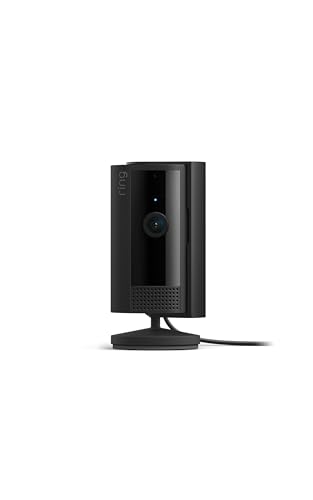 Ring Indoor Cam, 2nd Gen (ASIN: B0B6GJBKRK) | Check price on Amazon |
Key takeaways
- Five surveillance cameras that work alongside a Ring Video Doorbell in the same Ring app, with Linked Devices triggers, Live View and shared motion alerts.
As an Amazon Associate, we earn from qualifying purchases made through links on this page.
A Ring Video Doorbell watches one point: the front door. Cover the driveway, back garden, side gate or hallway as well and you need companion cameras, and the keyword behind this guide is read in one specific way. “Surveillance cameras for Ring Video Doorbell” is taken here to mean cameras that work inside the same Ring app as your doorbell, on the same account, in the same event feed. That reading matters, because the Ring app is a closed garden. Ring’s own support documentation describes the Ring app as the control point for Ring doorbells and Ring security cameras, and it documents a feature called Linked Devices that lets Ring devices react to each other: when the doorbell is pressed or detects motion, linked cameras can be set to record, and linked lights can be set to switch on. Events from linked devices then appear together in the app’s Event History as a Linked Event.
The limit of that integration has to be stated plainly. No camera from another brand streams inside the Ring app. Ring runs a Works with Ring program for partner hardware, but that program covers categories such as locks and lighting, not third-party camera feeds. A Wyze, Arlo, Blink or Reolink camera can protect the same house, yet it lives in its own separate app, with its own alerts and timeline, and the doorbell cannot trigger it through Linked Devices. Every camera in this guide is therefore a Ring camera, because Ring cameras are the only cameras that meet the keyword’s condition in documented fact rather than in marketing language. Each one sets up in the Ring app next to your doorbell and can be linked to the doorbell in both directions: the doorbell can trigger the camera, and the camera can trigger linked responses of its own.
One more shared condition applies to all five picks. Live View, motion alerts and Linked Devices triggers work without a subscription, but saving and playing back recorded video requires a Ring Home plan, which Ring sells separately, and none of these cameras accepts a memory card or records to a local hub. That is a platform rule, not a flaw of any single model, and it is flagged under each pick so the running cost is clear before you buy.
What to look for in a camera that sits beside a Ring doorbell
Ring app membership comes first. The camera must be a Ring device that registers in the Ring app under the same account as the doorbell. That single fact is what puts its clips in the same Event History, lets the doorbell trigger it through Linked Devices, and lets one app manage alerts for the whole property. If a camera needs a different app, it fails this guide’s test.
Power decides placement. Battery cameras can go almost anywhere but need their packs removed and recharged. Hardwired floodlight cameras never need charging and add serious light, but they need an existing electrical box or new wiring. Plug-in indoor cameras sit between the two: constant power, but tied to an indoor outlet.
Field of view shapes coverage. A doorbell sees a narrow slice of the front step, so companion cameras earn their place by seeing wider or different ground. Horizontal fields of view here run from 110 to 140 degrees: the widest suit driveways and gardens, the narrower ones gates, porches and single rooms.
Night performance differs by model. Some picks use standard infrared night vision with color support in low light, some add LED spotlights or floodlights that light the scene, and one indoor model relies on color night vision alone. Lights change behaviour as much as pictures: a floodlight camera announces itself, which can be the point of installing it.
Motion detection is not equal across the range. Every pick has customizable motion zones. The floodlight and spotlight models add their lights to the response, and Linked Devices adds a second layer: a camera can begin recording because the doorbell saw movement, even if its own sensor has not yet fired.
The subscription question applies to the whole system. Recorded video history, for the doorbell and for every camera here, sits behind the Ring Home plan. One plan tier covers a single device and higher tiers cover every Ring device at one address, per Ring’s plan documentation. Budget for the plan that covers all devices, or accept Live View and alerts without a recorded archive.
The cameras
Ring Floodlight Cam Wired Plus (ASIN: B08F6GPQQ7)
The Floodlight Cam Wired Plus is the heavy-duty partner for a Ring doorbell, built for driveways, garage fronts and garden approaches where light matters as much as video. It records 1080p HD video with Live View and Color Night Vision across a 140-degree horizontal and 80-degree vertical field of view. Two LED floodlights put out 2000 lumens at a 3000 Kelvin color temperature, and a remote-activated siren rated at 105 decibels can be triggered from the app. Advanced Motion Detection with customizable motion zones decides what sets it off.
In a Linked Devices setup, this is the camera to tie to the doorbell for the front of the house: a press or motion event at the doorbell can set it recording, and its lights answer driveway activity before a visitor reaches the step. Because it is hardwired on a 110 to 240 volt supply, it never goes flat. Ring specifies a working range from minus 4 degrees to 122 degrees Fahrenheit, and the housing is weather resistant. The unit measures 11.7 by 7.03 by 9.67 inches and mounts on a 4-inch round weatherproof electrical box, connecting over 2.4 GHz Wi-Fi.
Who it suits: households that want the front approach lit and recorded as one system with the doorbell, and that already have a floodlight fitting or an electrician booked.
Limitations from the specifications: it must be hardwired, so there is no placement freedom away from mains wiring, and Ring recommends professional installation. Video is 1080p rather than the 2K of Ring’s newer floodlight generation, and, like every pick here, recorded history needs the Ring Home plan.
Ring Outdoor Cam Plus, Battery (ASIN: B0D241GHP5)
Outdoor Cam Plus is Ring’s step up in picture detail for battery power. It records wide-angle 2K video with Ring Vision processing, and its Low-Light Sight feature holds a full-color picture further into dusk than a standard infrared sensor manages, so clothing and vehicle colors stay readable in dim conditions. It runs on a Quick Release Battery Pack that slides out for charging, and the camera body, at 2.6 by 2.6 by 5.0 inches including its stand, is built to sit on a surface or mount on a wall almost anywhere around the property.
Beside a doorbell, this is the pick for the back garden, a side return or a detached garage where no wiring exists. Link it to the doorbell and front-door activity can wake it to record its own angle, giving you the approach and the exit route in one Event History. Two-way talk lets you answer through the camera from the app.
Who it suits: Ring households that want the sharpest battery-powered picture in this guide for an unwired spot, and that are comfortable recharging a battery pack as routine upkeep.
Limitations from the specifications: battery power is the trade for placement freedom, and heavy motion traffic shortens the interval between charges. It has no built-in spotlight or floodlight, so it cannot light a scene the way the floodlight and spotlight models do, and recorded playback still depends on the Ring Home plan.
Ring Spotlight Cam Plus, Battery (ASIN: B09K1HHZTM)
Spotlight Cam Plus, Battery pairs a 1080p HD camera with two built-in LED spotlights, so the camera brings its own light to a porch, a side path or a back door without needing a wired fitting. It records with Live View and Color Night Vision across a 140-degree horizontal field of view, uses Advanced Motion Detection with customizable motion zones, and carries a remote-activated security siren. Two-way audio includes noise cancellation.
The spotlight makes this the natural mid-point of a doorbell system. Linked to the doorbell, it can record when the bell is pressed, and its own lights switch on when it detects motion at its post, which covers the common gap where a visitor leaves the front step and walks around the side of the house. Power comes from a rechargeable battery pack; one is included, the housing holds up to two, and an optional solar panel is sold separately. It connects over 2.4 GHz Wi-Fi, measures 3.0 by 3.2 by 5.0 inches, and is rated for minus 5 degrees to 120 degrees Fahrenheit.
Who it suits: homes that want light and video together at a second entrance or along a side path, without running new wiring.
Limitations from the specifications: video stays at 1080p HD while the Outdoor Cam Plus above records 2K, Wi-Fi is single-band 2.4 GHz only, and battery upkeep applies, with the second battery pack and solar panel both separate purchases.
Ring Outdoor Cam (Stick Up Cam), Battery (ASIN: B0C5QRZ47P)
The Outdoor Cam, long sold as the Stick Up Cam, is the simplest camera in Ring’s range and the easiest to place. It records 1080p HD video with Live View and Color Night Vision, with a field of view of 130 degrees diagonal, 110 degrees horizontal and 57 degrees vertical. The Quick-Release Battery Pack powers it, the integrated base works as a flat-surface stand or a wall mount, and Ring rates the weather-resistant housing from minus 5 degrees to 122 degrees Fahrenheit. The body measures 2.36 by 2.36 by 3.82 inches, and it connects over 2.4 GHz Wi-Fi.
Its role beside a doorbell is flexibility. It can watch a gate from a fence post this month and a garage interior next month, and because it is a full Ring app member it links to the doorbell: a doorbell press can set it recording, and its motion events land in the same history. For many homes it is the first camera to add.
Who it suits: anyone adding a first companion camera who values placement freedom and a small footprint over lights or maximum resolution.
Limitations from the specifications: there is no spotlight, floodlight or siren, the 110-degree horizontal view is the narrowest outdoors here, and video is 1080p HD in a range that now includes 2K models. Battery charging is manual, through the removable pack.
Ring Indoor Cam, 2nd Gen (ASIN: B0B6GJBKRK)
The Indoor Cam (2nd Gen) covers the inside of the front door, which is the one view a doorbell can never give you. It records 1080p HD video with Color Night Vision across a wide 143-degree diagonal, 115-degree horizontal and 59-degree vertical field of view, and it adds Advanced Pre-Roll, which captures the seconds before a motion event so the clip opens with context. Its signature feature is a manual privacy cover: swivel it closed and the camera and microphone switch off together, a physical control rather than a software promise. Two-way talk has noise cancellation, and the camera plugs in with the included power adapter and a 6.5-foot Micro USB cable. Dimensions are 1.93 by 1.93 by 3.81 inches including the ball-joint mount.
Linked to the doorbell, it completes the sequence: the doorbell shows the visitor arriving, and the indoor camera shows the hallway if the door opens, with both clips in the same Event History. It is equally at home watching a nursery, a home office or an elderly relative’s living room, and the privacy cover suits rooms where recording should stop while the family is in.
Who it suits: households that want the entry hallway or one key room inside the same Ring system, with a physical off switch for privacy.
Limitations from the specifications: it is an indoor-only, plug-in camera, so it cannot move to the garden and it needs an outlet within cable reach. There is no battery option, and recorded video again sits behind the Ring Home plan.
Comparison table
| Camera | Video | Field of view (horizontal) | Power | Light | Siren | Best role beside a doorbell |
|---|---|---|---|---|---|---|
| Ring Floodlight Cam Wired Plus | 1080p HD | 140 degrees | Hardwired | Two 2000-lumen floodlights | Yes, 105 dB | Driveway and front approach |
| Ring Outdoor Cam Plus, Battery | 2K | Wide-angle | Battery pack | None built in | No | Sharpest unwired garden coverage |
| Ring Spotlight Cam Plus, Battery | 1080p HD | 140 degrees | Battery pack, holds up to two | Two LED spotlights | Yes | Side path or second entrance |
| Ring Outdoor Cam (Stick Up Cam), Battery | 1080p HD | 110 degrees | Battery pack | None built in | No | Flexible first add-on camera |
| Ring Indoor Cam (2nd Gen) | 1080p HD | 115 degrees | Plug-in | None | No | Hallway and indoor rooms |
Frequently asked questions
Can a camera from another brand work inside the Ring app with my doorbell?
No. Ring’s documentation places Ring doorbells and Ring security cameras in the Ring app, and the Works with Ring partner program covers other categories such as locks and lights, not third-party camera feeds. A camera from another brand keeps its own app and cannot be linked to the doorbell through Linked Devices.
What does Linked Devices actually do between a doorbell and these cameras?
Per Ring’s support pages, you choose a trigger on one device, motion detected or, for doorbells, a press of the button, and choose what linked devices do in response: cameras record an event and lights switch on. With a Ring Home plan, the resulting clips appear in Event History as a Linked Event, so one incident reads as one story.
Do I need a Ring Home plan for these cameras to be useful?
Live View, motion alerts and Linked Devices triggers work without one. Saving, playing back and sharing recorded video requires the plan, and Ring sells it separately per device or per address depending on tier. There is no memory card slot on any camera in this guide, so there is no local recording fallback.
Which camera should be added first after the doorbell?
For most homes, the blind spot decides. If the driveway is dark and unwatched, the Floodlight Cam Wired Plus adds light and constant power. If the gap is a garden or gate with no wiring, the Outdoor Cam (Stick Up Cam) is the simplest first step, and the Outdoor Cam Plus is the step up when picture detail matters more.
Do these cameras work with Alexa?
Yes. Ring documents Alexa support across this camera range, so an Echo Show or Fire TV device can display a camera feed by voice, and motion announcements can be sent to Echo devices. That sits alongside the Ring app rather than replacing it; setup, linking and event history all stay in the Ring app.
Conclusion
A Ring Video Doorbell is one camera with one viewpoint, and the honest answer to this keyword is that only Ring’s own cameras join it in the Ring app, share its Event History and answer its triggers through Linked Devices. Within that boundary the choice is practical. Take the Floodlight Cam Wired Plus for a lit, always-powered front approach, the Outdoor Cam Plus for the sharpest battery picture in the garden, the Spotlight Cam Plus for light at a second entrance, the Outdoor Cam (Stick Up Cam) for the most flexible first addition, and the Indoor Cam (2nd Gen) for the hallway, with its physical privacy cover. Set the links in both directions, doorbell to camera and camera to doorbell, and one press at the front door becomes a recorded story for the whole property.