Our Short List of 3

- Best for: Roomy cases where a twin-tower cooler fits and a built-in display is wanted.
- Twin-tower radiator form stated in the listing
- 5-inch IPS screen with 480×854 stated resolution
- Dual PWM fans with 2150 RPM stated
- ARGB lighting, black finish
- Best for: High-heat processors where the largest stated cooling capacity in this comparison is wanted.
- 7 heatpipes
- 2 PWM fans, 2 Silent Wings 135mm fans
- 300W TDP stated
- Semi-passive mode and 2-mode speed switch
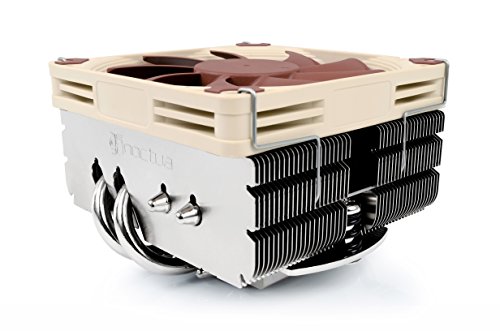
- Best for: Compact cases where a low-profile form is the deciding factor.
- Low-profile form stated in the listing
- Quiet, high-performance positioning stated in the listing
All 5 Picks at a Glance
| Product | Specs | Action |
|---|---|---|
| Thermalright Peerless Assassin 120 Vision MAX ARGB Black |
| Check price on Amazon |
| be quiet! Dark Rock Pro 6 |
| Check price on Amazon |
| Noctua NH-L9x65 |
| Check price on Amazon |
 Thermalright Assassin X 120R Digital ARGB Black |
| Check price on Amazon |
 be quiet! Pure Rock Low Profile |
| Check price on Amazon |
Key takeaways
- Compare five CPU air coolers for PCs, from a twin-tower display model to low-profile options, with socket support and form taken from each listing.
A CPU air cooler moves heat away from the processor through a metal heatsink and one or more fans, and the right one depends on your case space, your motherboard socket, and how much heat your processor produces. This article compares five air coolers against each other using only what each product listing states: the form named in the listing, the socket list, the fan and heatpipe wording, and the stated cooling capacity where one is given.
Two cautions shape every comparison below. First, form wording comes from the listing title itself: only one pick names a twin-tower form and two name a low-profile form, while two titles state no form at all and none is claimed for them. Second, socket support is stated only where the listing states it, and two picks carry no socket wording in the listing title used here, so their socket fit must be confirmed before buying.
Quick Picks
As an Amazon Associate we earn from qualifying purchases
| Product | Best for | Key spec from title |
|---|---|---|
| Thermalright Peerless Assassin 120 Vision MAX ARGB Black | A display on a twin-tower cooler | 5-inch IPS screen, 2150 RPM stated |
| be quiet! Dark Rock Pro 6 | High-heat builds needing cooling headroom | 300W TDP, 7 heatpipes |
| Noctua NH-L9x65 | Compact builds needing a low-profile cooler | Low-profile form |
| Thermalright Assassin X 120R Digital ARGB Black | A digital display on a heatsink cooler | Digital screen top cover |
| be quiet! Pure Rock Low Profile | Low-profile builds with a stated 100W ceiling | 100W TDP, model BK034 |
How to Choose
Match the Cooler Form to Your Case
The form named in a listing tells you how much room the cooler expects. A twin-tower cooler uses two heatsink stacks and suits a roomy case, while a low-profile cooler is built for tight cases where a tall tower will not fit. The Thermalright Vision MAX names a twin-tower form, and the Noctua NH-L9x65 and the be quiet! Pure Rock Low Profile both name a low-profile form. The Dark Rock Pro 6 and the Assassin X 120R Digital name no form in their listing titles, so judge them on their stated fan counts and heatpipe wording instead, and always check the clearance your case allows before settling on any pick.
Check Socket Support in the Listing
A cooler that does not mount on your motherboard socket is the wrong cooler no matter how strong its stated cooling capacity looks. Three of the five listings state their sockets directly: the Vision MAX lists Intel LGA 1851, 1700, and 115x alongside AMD AM4 and AM5, the Assassin X 120R Digital lists AM4 and AM5 with Intel LGA 1851, 1700, 115X, and 1200, and the Pure Rock Low Profile lists Intel 1700, 1200, 1150, 1151, and 1155 with AMD AM5 and AM4. The Dark Rock Pro 6 and the NH-L9x65 carry no socket wording in the listing titles used here, so their fit must be confirmed from the full listing before buying.
Read Heatpipes, Fans, and TDP Wording
Heatpipes carry heat from the processor into the heatsink fins, fans push air through those fins, and the stated TDP figure describes the cooling capacity the listing claims. The Dark Rock Pro 6 states seven heatpipes, two PWM fans, and a 300W TDP figure, the largest stated capacity in this comparison, while the Pure Rock Low Profile states a 100W TDP figure, a much lower stated ceiling suited to less demanding processors. The Vision MAX states a 2150 RPM fan speed, and the Assassin X 120R Digital names its TL-P12-S PWM fan. Treat a TDP figure as the listing’s own claim about capacity, not as a measured result.
Decide What Displays and Lighting Add
Two picks in this comparison carry screens, and two carry ARGB lighting, and neither feature cools your processor on its own. The Vision MAX states a 5-inch IPS screen with a 480×854 stated resolution, and the Assassin X 120R Digital states a digital screen top cover, so both put information on the cooler itself rather than only in software. The Dark Rock Pro 6 adds a semi-passive mode and a two-mode speed switch, which change how its fans behave rather than how much heat the heatsink can move. Choose a screen or lighting only after the form, socket, and stated capacity fit your build.
The 5 Best Options
Thermalright Peerless Assassin 120 Vision MAX ARGB Black
- Best for: Roomy cases where a twin-tower cooler fits and a built-in display is wanted.
- Twin-tower radiator form stated in the listing
- 5-inch IPS screen with 480×854 stated resolution
- Dual PWM fans with 2150 RPM stated
- ARGB lighting, black finish
Roomy cases where a twin-tower cooler fits and a built-in display is wanted.
Twin-tower coolers need generous case clearance, so confirm the height your case allows before buying.
The Vision MAX is the only pick here whose listing names a twin-tower form, and it pairs that layout with a display: a 5-inch IPS screen with a 480×854 stated resolution sits on the cooler, and the listing states a 2150 RPM fan speed for its dual PWM fans. ARGB lighting is stated in the listing title, and the socket list is the broadest in this comparison, covering Intel LGA 1851, 1700, and 115x alongside AMD AM4 and AM5. It is the natural first look for a builder with a roomy case who wants cooler information visible on the hardware itself.
Watch out for: Twin-tower coolers need generous case clearance, so confirm the height your case allows before buying.
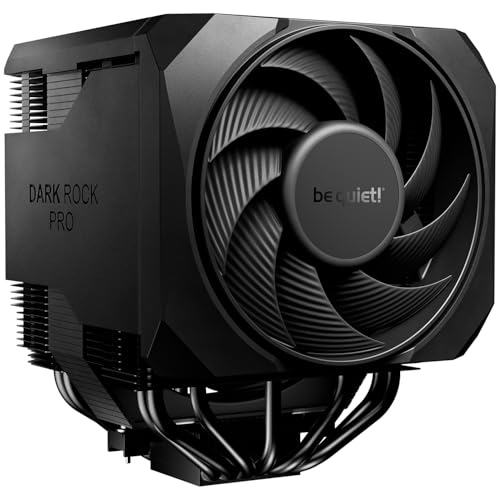
be quiet! Dark Rock Pro 6
- Best for: High-heat processors where the largest stated cooling capacity in this comparison is wanted.
- 7 heatpipes
- 2 PWM fans, 2 Silent Wings 135mm fans
- 300W TDP stated
- Semi-passive mode and 2-mode speed switch
High-heat processors where the largest stated cooling capacity in this comparison is wanted.
No socket list is stated in the listing title used here, so confirm your socket from the full listing before buying.
The Dark Rock Pro 6 leads this comparison on stated cooling capacity, with seven heatpipes, two PWM fans, and a 300W TDP figure in its listing title, and it is positioned in the listing for overclocking. Its two Silent Wings 135mm fans are named in the listing, along with a semi-passive mode, high RAM and VRM cooler compatibility, and a two-mode speed switch. The listing title states no form word and no socket list, so this pick should be judged on its stated capacity and fan wording, with socket fit and case clearance confirmed from the full listing before buying.
Watch out for: No socket list is stated in the listing title used here, so confirm your socket from the full listing before buying.
Noctua NH-L9x65
- Best for: Compact cases where a low-profile form is the deciding factor.
- Low-profile form stated in the listing
- Quiet, high-performance positioning stated in the listing
Compact cases where a low-profile form is the deciding factor.
No socket list, fan size, or heatpipe count is stated in the listing title used here, so confirm all three from the full listing before buying.
The NH-L9x65 is the low-profile pick with the thinnest listing wording in this comparison: its title states a quiet, high-performance, low-profile CPU cooler and nothing more, with no socket list, no fan size, and no heatpipe count. That thin wording is itself useful information, because it means the comparison rests on form alone for this pick rather than on stated capacity figures. It belongs on the shortlist for compact builds where a low-profile form is the deciding factor, and its socket fit must be confirmed from the full listing before buying.
Watch out for: No socket list, fan size, or heatpipe count is stated in the listing title used here, so confirm all three from the full listing before buying.
Thermalright Assassin X 120R Digital ARGB Black
- Best for: Builders who want a digital display and a broad stated socket list.
- Digital screen top cover
- TL-P12-S PWM quiet fan
- Heatsink cooling, ARGB lighting, black finish
- Socket support: AMD AM4 and AM5; Intel LGA 1851, 1700, 115X, and 1200
Builders who want a digital display and a broad stated socket list.
No tower form is stated in the listing title, so do not assume a dual-tower layout from the model name alone.
The Assassin X 120R Digital is the second display pick in this comparison, with a digital screen top cover stated in its listing title, and it names its fan directly: a TL-P12-S PWM quiet fan on a heatsink cooler with ARGB lighting and a black finish. Its socket list is broad, covering AMD AM4 and AM5 with Intel LGA 1851, 1700, 115X, and 1200, which makes it the easiest display pick to match to a motherboard from the listing wording alone. The listing title states no tower form, so compare it on its one stated fan and its screen rather than on a tower layout.
Watch out for: No tower form is stated in the listing title, so do not assume a dual-tower layout from the model name alone.
be quiet! Pure Rock Low Profile
- Best for: Compact builds with a processor inside the stated 100W ceiling.
- Low-profile form stated in the listing
- 100W TDP stated
- Socket support: Intel 1700, 1200, 1150, 1151, and 1155; AMD AM5 and AM4
- Model code BK034
Compact builds with a processor inside the stated 100W ceiling.
The stated 100W ceiling is lower than the 300W figure on the Dark Rock Pro 6, so check your processor’s heat output against it.
The Pure Rock Low Profile is the second low-profile pick, and unlike the Noctua it states both a cooling ceiling and a full socket list in its listing title: a 100W TDP figure with Intel 1700, 1200, 1150, 1151, and 1155 alongside AMD AM5 and AM4, plus the model code BK034. That combination makes it the most completely described low-profile pick in this comparison, and the right first look for a compact build with a processor inside its stated 100W ceiling. Where a processor runs hotter than that stated figure, the twin-tower and 300W picks above are the better comparison points.
Watch out for: The stated 100W ceiling is lower than the 300W figure on the Dark Rock Pro 6, so check your processor’s heat output against it.
Which One Fits Your Situation
You Have a Tall Case and a Hot Processor
Start with the two picks that state the most cooling capacity. The Dark Rock Pro 6 states seven heatpipes, two fans, and a 300W TDP figure, and the Vision MAX states a twin-tower form with dual PWM fans at 2150 RPM. Both need a roomy case, and the Vision MAX adds a built-in display. Confirm case clearance for either one, and confirm socket fit for the Dark Rock Pro 6, whose listing title states no socket list.
You Are Building in a Small Case
The two low-profile picks are the comparison points here. The Noctua NH-L9x65 states a low-profile form with quiet, high-performance positioning, while the be quiet! Pure Rock Low Profile states a low-profile form with a 100W TDP ceiling and a full socket list. Where socket fit must be settled from the listing wording alone, the Pure Rock Low Profile is the easier match, and where the quietest positioning matters most, the Noctua’s listing wording leads.
You Want a Display on the Cooler
Two picks carry screens, and the choice turns on form and socket wording. The Vision MAX pairs its 5-inch IPS screen with a twin-tower form and the broadest stated socket list here, while the Assassin X 120R Digital pairs its digital screen top cover with one stated PWM fan and a broad socket list. Pick the Vision MAX where a twin-tower layout fits, and the Assassin X 120R Digital where the display matters more than the tower form.
Your Socket Is Older or Unusual
Socket wording decides this situation. The Vision MAX, the Assassin X 120R Digital, and the Pure Rock Low Profile all state their socket lists in their listing titles, including older Intel LGA 115x sockets, so any of the three can be matched from the listing alone. The Dark Rock Pro 6 and the NH-L9x65 state no socket list in the titles used here, so never assume they fit an older socket: confirm the fit from the full listing first.
Common Mistakes
- Assuming every air cooler fits every socket instead of checking the socket list stated in the listing.
- Ignoring case clearance, especially with twin-tower coolers that need generous height.
- Treating a stated TDP figure as a measured result rather than the listing’s own capacity claim.
- Buying on a display or ARGB lighting alone, before form, socket, and stated capacity fit the build.
- Mixing up model variants, such as the Vision MAX Black with other Vision MAX listings, or the Digital Assassin X with non-digital versions.
Frequently Asked Questions
Are air coolers enough for gaming PCs?
They can be, depending on how much heat the processor produces and the capacity the listing states. The Dark Rock Pro 6 states a 300W TDP figure with seven heatpipes and two fans and is positioned for overclocking, while the Pure Rock Low Profile states a 100W ceiling suited to less demanding processors. Match the stated capacity to your processor’s heat output, and confirm socket and clearance as well.
Do I need a display on my CPU cooler?
No, a display is not needed for cooling. The screens on the Vision MAX and the Assassin X 120R Digital show information on the cooler itself, but the cooling itself comes from the heatsink and fan, which every pick here states. Choose a display pick only after the form, socket list, and stated capacity already fit your build, and treat the screen as convenience rather than cooling performance.
What does TDP mean on a cooler listing?
TDP stands for thermal design power, and on a cooler listing the stated TDP figure describes the capacity the listing claims the cooler can handle. The Dark Rock Pro 6 states 300W while the Pure Rock Low Profile states 100W, so the first claims more headroom than the second. Use the figure to compare listings with each other and with your processor’s heat output, not as a guarantee of temperatures.
How do I know a cooler fits my motherboard?
Check the socket list stated in the product listing and match it to your motherboard’s socket. Three picks here state their sockets in their titles, including Intel LGA 1851, 1700, 1200, and 115x alongside AMD AM4 and AM5. The Dark Rock Pro 6 and the NH-L9x65 state no socket list in the titles used here, so confirm their fit from the full listing, and check case clearance too.