Key takeaways
- Dual material IDEX 3D printers compared by build volume, extruder setup and print modes, led by the one true bundle with filament included.
Disclosure: As an Amazon Associate, we earn from qualifying purchases.
Our top pick: FlashForge Creator Pro 2. Runner-up: JGMAKER Artist-D Pro.
A dual material printer carries two extruders on one machine, so a single job can use two filaments instead of one. That opens up printing styles a single-extruder machine cannot manage on its own: a part in two colours, a rigid body with a flexible section, or a model printed in a main material with supports laid down in a soluble filament that washes away afterwards. The three machines in this guide all use independent dual extruders, often shortened to IDEX, which means each extruder moves on its own and can work separately, together, or as a copy of the other.
One point about the word bundles needs to be stated plainly at the start, because it shapes this whole guide. Genuine dual material printers sold as bundles, with extras packed in the box, are rare. Of the three machines below, only one is a true bundle: the FlashForge Creator Pro 2, whose listing includes two spools of PLA filament with the printer. The JGMAKER Artist-D Pro and the TENLOG TL-D3 Pro are verified dual material printers, but their listings sell them as a bare printer and a printer kit respectively, with no filament package stated. They are included because they are real dual material machines with traceable listings, and each section below states its bundle status in plain terms rather than dressing a bare printer up as something it is not. If what matters most is opening one box and printing, the FlashForge is the only pick here that fits that description.
Quick Picks
- FlashForge Creator Pro 2 — Best true bundle: an enclosed IDEX printer with two 1 kg spools of PLA included, plus mirror, duplicate, soluble support and multi-material modes.
- JGMAKER Artist-D Pro — Best larger build volume: a direct drive IDEX machine in the 300 x 300 x 340 mm class, sold as a bare printer kit.
- TENLOG TL-D3 Pro — Best tall build volume: an IDEX printer in the 300 x 300 x 350 mm class with a silent mainboard, sold as a bare printer; check its listing carefully before ordering, for the reasons given in its section.
FlashForge Creator Pro 2
OUR TOP PICK
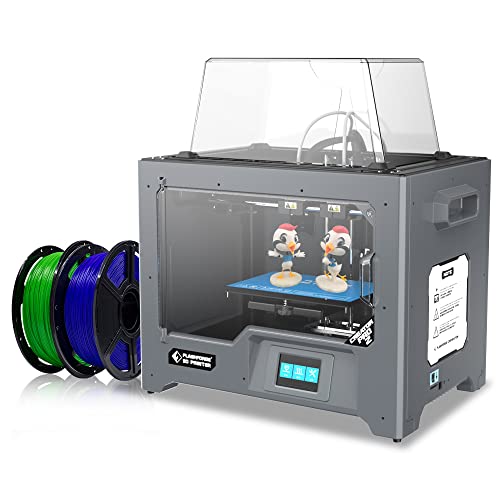
The FlashForge Creator Pro 2 is the only machine in this guide that arrives as a bundle in the proper sense: the listing includes two free spools of PLA filament, 1 kg per spool, alongside the printer itself. For a buyer who wants to unbox one package and start printing in two materials the same day, that matters, because the second extruder on a dual material machine is only useful once there are two filaments loaded into it. The printer underneath the bundle is an independent dual extruder machine with two 0.4 mm nozzles and a maximum extruder temperature of 240°C, as stated on the listing.
The four print modes are where this machine earns its place. In multi-material mode the two extruders work on one part, so two filaments can be combined in a single model. Soluble support mode pairs a main material with a support material such as PVA or HIPS, which can be removed after printing instead of being snapped away by hand, leaving cleaner undersides on complex shapes. Mirror mode prints a part and its mirrored copy at the same time, and duplicate mode prints two identical parts at once; both of those modes work within a reduced build area, which the listing states as 80 x 148 x 150 mm for mirror mode and 95 x 148 x 150 mm for duplicate mode, against the standard build volume of 200 x 148 x 150 mm. That trade is worth understanding before purchase: the full build volume belongs to single-part printing, and the two-at-once modes halve the working width to make room for both extruders to run side by side.
The chamber is an enclosed metal frame, which suits the filament list the listing gives: PLA, Pearl PLA, ABS, ABS Pro, PVA and HIPS. An enclosure helps hold a steadier temperature around the print, which is the practical requirement behind materials such as ABS, and it also keeps the working area tidier on a desk or bench. The build volume is the smallest in this guide, so this is a machine for parts that fit inside roughly a 200 mm cube footprint rather than for large single pieces. Within that size, though, it is the most complete package here: enclosed chamber, four working modes, soluble support support, and filament in the box.
Specs
– Model: FFCP2
– Extruder system: Independent Dual Extruder (IDEX), 2 extruders, 0.4 mm nozzles
– Maximum extruder temperature: 240°C, as stated on the listing
– Build volume: 200 x 148 x 150 mm
– Mirror mode build volume: 80 x 148 x 150 mm; duplicate mode: 95 x 148 x 150 mm, as stated on the listing
– Modes: Mirror, Duplicate, Soluble Support, Multi-material
– Frame: Enclosed metal-frame chamber
– Filaments stated on the listing: PLA, Pearl PLA, ABS, ABS Pro, PVA, HIPS
– Included in the box: 2 spools of PLA filament, 1 kg per spool
Pros
– The only true bundle in this guide, with two 1 kg spools of PLA included
– Four modes, including soluble support printing with PVA or HIPS
– Enclosed metal-frame chamber suits ABS and ABS Pro
– Two independent extruders, so mirror and duplicate modes print two parts at once
Cons
– Smallest build volume in this guide at 200 x 148 x 150 mm
– Mirror and duplicate modes shrink the usable build width further
– Maximum extruder temperature of 240°C rules out higher-temperature filaments
JGMAKER Artist-D Pro

The JGMAKER Artist-D Pro is the larger machine of the first two picks, and it needs an honest label before anything else: it is sold as a printer kit, and no filament or extras bundle was stated in the listing copy checked for this guide. Treat it as a bare dual material printer. Anyone choosing it will need to order filament separately before the second extruder can do any work, and that should be planned as part of the purchase rather than discovered on unboxing day.
What the Artist-D Pro brings instead is size and a direct drive extrusion setup. Its build size is listed at 11.81 x 11.81 x 13.38 inches, the 300 x 300 x 340 mm class, which is a much bigger working area than the FlashForge above and enough for large single parts as well as paired printing. The extruders are direct drive, meaning the feed mechanism sits at the hot end rather than pushing filament down a long tube, a layout generally chosen because it handles flexible filament such as TPU more reliably. The stated filament list fits that design: PLA, ABS, TPU, PVA and wood-filled filament are all named on the listing. Layer thickness is stated as 0.05 to 0.3 mm.
The motion and electronics hardware is specified in more detail than on many machines of this type. The listing names dual Z-axis screws with dual motors, a linear rail on the X-axis, an optical endstop, a Mean Well power supply, and a 32-bit board running TMC2209 stepper drivers. Dual nozzle-cleaning brushes are fitted, a small detail that matters on an IDEX machine because the idle extruder sits parked while the other prints, and a brush pass helps keep its nozzle clean before it swings back into work. None of that turns the Artist-D Pro into a bundle, and this guide will not pretend otherwise. It is a bigger, direct drive dual material printer for a buyer who is comfortable sourcing filament and any extras separately, and who values build volume over an all-in-one box.
Specs
– Model: Artist-D Pro
– Extruder system: Independent Dual Extrusion (IDEX), direct drive extruders
– Build size: 11.81 x 11.81 x 13.38 in (300 x 300 x 340 mm class), as stated on the listing
– Layer thickness: 0.05 to 0.3 mm, as stated on the listing
– Motion: Dual Z-axis screws and motors, linear rail X-axis, optical endstop
– Electronics: 32-bit board with TMC2209 drivers, Mean Well power supply
– Nozzle care: Dual nozzle-cleaning brushes
– Filaments stated on the listing: PLA, ABS, TPU, PVA, Wood
– Bundle status: Bare printer kit; no filament or extras bundle stated in the listing
Pros
– Largest build area of the first two picks, in the 300 x 300 x 340 mm class
– Direct drive extruders suit flexible filaments such as TPU
– Dual Z screws, linear rail X-axis and TMC2209 drivers
– Dual nozzle-cleaning brushes for the parked extruder
Cons
– Not a bundle: no filament is included, so spools must be ordered separately
– Sold as a kit, so expect assembly and setup time before printing
– No enclosed chamber is stated on the listing
TENLOG TL-D3 Pro
The TENLOG TL-D3 Pro is the third dual material machine in this guide, and its section carries two cautions that a buyer should read before anything else. First, it is a bare printer, not a bundle: no filament package or extras set was verified with it. Second, the ASIN recorded for this model rests on a Canadian listing copy of the same machine rather than a United States listing copy, and other sources attach a different code to a manual for this model, which suggests more than one listing or variant may exist. The right way to treat this pick is as a machine worth considering whose exact listing must be confirmed before ordering: check that the page names the TL-D3 Pro, that the build volume and board details match the figures below, and that the nozzle temperature is taken from that page itself.
That last point matters because the temperature figure for this printer is disputed. One listing title states a 300°C high-temperature nozzle, while other sources state 260°C. This guide publishes neither figure, because printing the wrong one would misstate the machine. Until the verified United States listing settles it, the honest position is that the TL-D3 Pro has a high-temperature nozzle of some rating, and the exact number has to come from the listing being ordered from.
On the details that are consistent, the TL-D3 Pro is an independent dual extruder printer with direct feed, a build volume of 11.8 x 11.8 x 13.8 inches, the 300 x 300 x 350 mm class, which makes it the tallest build area in this guide. It runs a silent mainboard fitted with TMC2208 drivers and a 600 W power supply. The stated filament list is PVA, TPU, ABS and PLA, which covers the main dual material use cases: two-colour PLA work, flexible TPU sections, and PVA soluble supports paired with a main material. Chosen carefully, with the listing checks above actually done, it is a tall-volume IDEX option. Chosen without those checks, it is the one pick in this guide where a buyer could end up with a different variant than the one described here.
Specs
– Extruder system: Independent Dual Extruder (IDEX), direct feed
– Build volume: 11.8 x 11.8 x 13.8 in (300 x 300 x 350 mm class), as stated on the listing copy checked
– Mainboard: Silent mainboard with TMC2208 drivers
– Power supply: 600 W
– Filaments stated on the listing: PVA, TPU, ABS, PLA
– Nozzle temperature: Not stated in this guide; published figures conflict, so take the rating from the verified listing before ordering
– Bundle status: Bare printer; no filament or extras bundle verified
Pros
– Tallest build volume in this guide, in the 300 x 300 x 350 mm class
– Independent dual extruders with direct feed
– Silent mainboard with TMC2208 drivers
– Filament list covers PVA soluble supports and flexible TPU
Cons
– Not a bundle: no filament included
– Listing verification is weaker than the other two picks; confirm the exact United States listing before ordering
– Nozzle temperature figures conflict between sources, so the rating must be confirmed on the listing itself
How to Choose
Start with the bundle question, because it decides the shape of the whole purchase. Only the FlashForge Creator Pro 2 includes filament in the box, two 1 kg spools of PLA. The JGMAKER and the TENLOG are bare machines, so a buyer choosing either of them should order at least two spools at the same time; a dual material printer with one spool on hand is a single material printer until the second spool arrives. Check the box contents line of any listing rather than assuming a printer and a bundle are the same thing.
Next, match the extruder layout to the materials planned. All three machines here use independent dual extruders, which is the layout that allows mirror and duplicate printing as well as two-material work. Direct drive machines, the JGMAKER and the TENLOG, feed filament at the hot end and are the usual choice when flexible TPU is part of the plan. For soluble supports, check the filament list for PVA or HIPS: the FlashForge names both, the JGMAKER names PVA, and the TENLOG names PVA. A support material only helps if it pairs with the main material being printed, so plan the pairing rather than buying a support spool at random.
Then look at build volume honestly, including what happens in the paired modes. The FlashForge gives 200 x 148 x 150 mm for a single part, and its mirror and duplicate modes cut the width to 80 mm and 95 mm respectively. The JGMAKER and the TENLOG work in the 300 mm class in both width and depth, with the TENLOG slightly taller. A buyer printing pairs of small parts may never feel the FlashForge limits, while a buyer printing one large part will feel them immediately.
Finally, weigh the chamber and the electronics. An enclosed chamber, as on the FlashForge, is the practical feature behind printing ABS without the part cooling unevenly. Silent stepper drivers, TMC2209 on the JGMAKER and TMC2208 on the TENLOG, decide how much motor noise the machine makes across a long print. And for any machine whose listing history is less clear, the TENLOG here being the example, treat the listing check as part of the purchase: confirm the model name, the build volume and every headline figure on the page being ordered from.
FAQs
What does dual material printing actually allow?
Two filaments in one job. That can mean two colours in a single part, a rigid material combined with a flexible one, or a main material printed with supports in a soluble filament such as PVA or HIPS that can be removed afterwards instead of being broken away. All three printers in this guide use independent dual extruders, so each extruder can also work on its own part in mirror or duplicate style printing, within the reduced build areas those modes allow.
Are all three printers in this guide sold as bundles?
No, and this guide is deliberately plain about that. Only the FlashForge Creator Pro 2 is a true bundle, with two 1 kg spools of PLA included in the listing. The JGMAKER Artist-D Pro is sold as a printer kit and the TENLOG TL-D3 Pro as a bare printer, and no filament package was verified for either of them. A buyer choosing one of those two should order filament separately at the same time.
What should be checked before ordering the TENLOG TL-D3 Pro?
Three things. First, that the listing actually names the TL-D3 Pro, because more than one listing or variant of this model may exist. Second, that the build volume and the silent mainboard details match the figures in its section above. Third, the nozzle temperature rating, which must be taken from the listing itself: published figures for this model conflict, so no rating is stated in this guide. If the listing cannot be confirmed on those points, the safer course is to choose one of the other two machines.
Conclusion
For most buyers, the FlashForge Creator Pro 2 is the top pick: it is the only true bundle here, with two spools of PLA in the box, an enclosed chamber, and four modes that cover multi-material printing and soluble supports. The JGMAKER Artist-D Pro is the runner-up for buyers who want a larger build area and direct drive extruders and are happy to source filament separately. The TENLOG TL-D3 Pro brings the tallest build volume of the three, but it should only be ordered after its listing has been checked carefully, model name, figures and nozzle rating included. Whichever machine is chosen, the working rule is the same: confirm what is actually in the box before assuming a dual material printer arrives ready to print in two materials.