Our Short List of 3

All 3 Picks at a Glance
| Product | Specs | Action |
|---|---|---|
| 2. HEHALOTU A1466 — An Alternative for the Same MacBook Air Family | Check price on Amazon | |
 3. SNSYIY A1713 / A2171 — For MacBook Pro 13-Inch (2016–2020) | Check price on Amazon | |
| 4. A1965 Replacement Battery — For MacBook Air Retina 13-Inch (2018–2020) | Check price on Amazon |
Key takeaways
- Find the best aftermarket Mac battery by matching your MacBook model number, battery part number, voltage and capacity, with four replacement picks for Air and Pro models.
As an Amazon Associate we earn from qualifying purchases.
Affiliate Disclosure: This article contains affiliate links. If you buy through a link on this page, we may earn a commission at no extra cost to you. Product specifications below are taken from the manufacturers’ and sellers’ product listings, not from detailed research by our team.
A MacBook that dies halfway through a work session, swells against its trackpad, or shows a “Service Recommended” warning is usually not finished as a computer. It is finished as a battery. For older MacBooks especially, an aftermarket replacement battery is often the most sensible way to extend the machine’s life, because the rest of the hardware — the screen, keyboard, storage and logic board — is frequently still working well. The catch is that there is no such thing as a universal Mac battery. Apple changed battery shapes, connectors, voltages and capacities almost every time it revised a model line, so the best aftermarket Mac battery is always the one that matches your specific machine, not the one with the biggest number on the box.
This guide is organised around that reality. First, it explains how to identify exactly which battery your MacBook needs, using the model number, the EMC number and the battery part number. Then it presents four aftermarket replacement batteries that cover some of the most common MacBook Air and MacBook Pro generations still in daily use. Each pick lists the machines it fits, the battery part numbers it replaces, and the voltage and capacity stated on its product listing, so you can cross-check every figure against your own Mac before you order anything.
Why Model Matching Matters More Than Brand
Two MacBooks that look identical from the outside can use completely different batteries inside. The 13-inch MacBook Air kept the same wedge shape for years, yet the battery inside a 2011 machine and the battery inside a 2017 machine are ordered under the same family of part numbers in some listings and different ones in others. The MacBook Pro line is even less forgiving: a 13-inch Pro from 2015, a 13-inch Pro from 2017 and a 13-inch Pro from 2020 all use different battery packs with different voltages, different cell layouts and different connectors. Installing a physically similar but electrically wrong battery can mean a machine that will not charge, will not report its charge level correctly, or will shut down under load.
That is why every reputable aftermarket listing leads with compatibility codes rather than marketing claims. When you read the picks below, treat the model numbers and part numbers as the product. The brand name matters for warranty support and cell quality, but compatibility is decided entirely by whether the codes on the listing match the codes for your machine.
How to Find the Battery Your MacBook Actually Needs
Before you buy any aftermarket Mac battery, work through these identification steps in order. Together they take only a few minutes and they remove almost all of the guesswork.
Start with About This Mac. Click the Apple menu in the top-left corner of the screen and choose About This Mac. Note the model name and year, such as “MacBook Air (13-inch, Early 2015)” or “MacBook Pro (13-inch, 2017, Two Thunderbolt 3 Ports)”. This narrows the field but does not finish the job, because some years contain more than one hardware revision.
Find the model number on the bottom case. Flip the MacBook over and read the fine print on the underside. You are looking for a number in the format A followed by four digits, such as A1466, A1708 or A1932. This A-number identifies the enclosure family and is the first code every battery listing uses. The same print usually includes an EMC number, which separates revisions that share an A-number.
Check the model identifier and cycle count. In the same About This Mac window, open System Report and look at the model identifier, such as MacBookAir7,2 or MacBookPro14,1. Then, under the Power section, check the cycle count and condition of your current battery. A high cycle count with a “Service Recommended” condition confirms that the battery itself, rather than a charger or software fault, is the problem worth solving.
Read the part number on the old battery, if you can. If you are comfortable opening the bottom case, the original battery carries its own part number, such as A1496, A1405, A1713 or A1965. A replacement listing should name that exact part number among the ones it replaces. If the listing does not mention your battery’s part number at all, do not assume it fits, even if the laptop model sounds right.
Match voltage as well as shape. Each MacBook battery family runs at a specific voltage — the MacBook Air A1466 family at 7.6V, the Retina MacBook Pro 13-inch families at around 11.4V, and so on. A correct replacement states the same voltage as the original. Capacity, expressed in milliamp hours or watt hours, should be close to the original figure; a listing that promises dramatically more capacity than the original pack in the same physical space deserves scepticism rather than excitement.
The Picks: Four Aftermarket Mac Batteries for Common Models
The four batteries below cover the MacBook Air 13-inch from 2010 to 2017, the MacBook Air Retina from 2018 to 2020, and the MacBook Pro 13-inch generations from late 2016 through the first Apple silicon model of 2020. If your machine is not in one of those groups, use the identification steps above and shop by your own A-number and part number instead of stretching one of these picks to fit.
1. NinjaBatt A1466 — For MacBook Air 13-Inch (2010–2017)
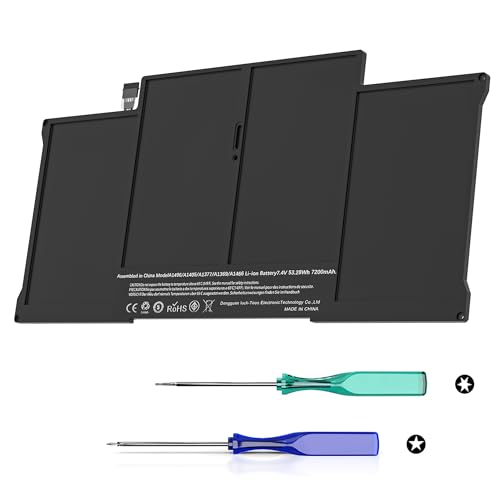
The NinjaBatt A1466 is built for the long-running 13-inch MacBook Air line, covering the A1466 models from Mid 2012 through 2017 and the earlier A1369 models from Late 2010 and Mid 2011. It replaces Apple battery part numbers A1496, A1405 and A1377, along with the related Apple order codes listed on its product page, including 661-7474. The listing rates the pack at 7160mAh and 54.4Wh at 7.6V, using lithium-polymer cells, which lines up with the original battery’s electrical specification for this family.
This is the pick that will suit the largest number of readers, simply because Apple sold the A1466 Air for so many years and so many of those machines are now running on tired original batteries. The listing states that screwdrivers are included for installation, which matters on this model because the battery is held in by screws rather than adhesive, making the Air one of the more approachable MacBooks for a careful home replacement. As with every pick here, confirm your EMC number against the listing’s compatibility list before ordering, because the A1466 family spans several revisions from 2012 to 2017.
ASIN: B09HSGB6TB
2. HEHALOTU A1466 — An Alternative for the Same MacBook Air Family
The HEHALOTU A1466 covers the same MacBook Air territory as the first pick: the 13-inch A1466 from Mid 2012, Mid 2013, Early 2014, Early 2015 and 2017, plus the A1369 from Late 2010 and Mid 2011, and it is listed as fitting battery part numbers A1496, A1405 and A1377. Its listing rates capacity at 7200mAh and describes the pack as an upgraded third-generation design. The seller’s compatibility list is unusually detailed, breaking out each model year with its EMC number and model identifier — for example EMC 2559 for the Mid 2012 machine, EMC 2632 for Mid 2013 and Early 2014, EMC 2925 for Early 2015 and EMC 3178 for the 2017 version.
Having two credible options for the same machine family is genuinely useful, because availability of any single aftermarket listing changes over time. If you own an A1466 or A1369 Air, compare both listings against your EMC number, check which one is currently offered by a seller you are comfortable with, and note the warranty terms stated on each page. The HEHALOTU listing states a one-year warranty description on its product page. Neither pick is “better” in the abstract; the right one is the one whose compatibility list contains your exact revision.
3. SNSYIY A1713 / A2171 — For MacBook Pro 13-Inch (2016–2020)
The SNSYIY battery for the 13-inch MacBook Pro addresses a newer and more complicated family. One listing covers two battery part numbers, A1713 and A2171, because Apple used closely related packs across several generations: the A1708 MacBook Pro from Late 2016 and Mid 2017, the A2159 from 2019, the A2289 from 2020 and the A2338 from 2020, which is the first 13-inch Pro with Apple silicon. The listing rates this pack at 5800mAh and 66.2Wh at 11.41V, describes it as a six-cell lithium-ion battery, and states a cycle life of up to 1500 recharge cycles, with built-in protection against overcharging and over-discharging.
Read the compatibility section of this listing with particular care. It separates the A1713 fitments (the A1708 machines, EMC 2978 and 3164) from the A2171 fitments (A2159 EMC 3301, A2289 EMC 3456 and A2338 EMC 3578), and your machine must appear in one of those groups. Also be aware that batteries in these Pro models are typically secured with adhesive rather than screws alone, so installation is more involved than on the older Air. If you are not confident about that process, buying the correct battery and paying a repair shop to fit it is a reasonable middle path between a full manufacturer service and a difficult home repair.
4. A1965 Replacement Battery — For MacBook Air Retina 13-Inch (2018–2020)
The Retina MacBook Air that arrived in 2018 uses a different battery from the older wedge-shaped Air, and this A1965 replacement is made for it. It fits the A1932 MacBook Air from Late 2018 and 2019 (EMC 3184, model identifiers MacBookAir8,1 and MacBookAir8,2) and the A2179 from Early 2020 (EMC 3302, MacBookAir9,1). The listing describes Grade A cells, built-in protection against overheating, overcurrent and overload, and a life of up to 500 charge and discharge cycles, and it states that the pack matches the original battery’s size so it seats in the same battery bay.
The most common mistake with this generation is ordering an A1466 battery because the machine is “a 13-inch Air”. The Retina Air’s A1965 pack is a different part for a different chassis, and the two are not interchangeable. Check the A-number on your bottom case: if it says A1932 or A2179, this is your family; if it says A1466 or A1369, you want one of the first two picks instead. The listing also enumerates the original order numbers it supports, such as MRE82, MRE92, MVFH2 and MWTJ2, which gives you one more cross-check against the details in About This Mac.
Installation: What to Expect
Replacing a Mac battery sits on a spectrum of difficulty. The screw-secured batteries in the older MacBook Air and the oldest MacBook Pro models are the most approachable: power the machine down, remove the bottom case with the correct pentalobe driver, disconnect the battery connector before touching anything else, swap the packs, and reassemble. The adhesive-secured batteries in the Retina and later Pro models are a different proposition, because the pack must be separated from the top case without bending or puncturing the cells. A bent lithium cell is a genuine fire risk, not a cosmetic issue.
Whatever model you own, a few rules apply universally. Work with the machine fully shut down and unplugged. Never lever against a battery cell with a metal tool. If a swollen battery is involved — one that has pushed the trackpad up or split the case seam — do not attempt a home replacement at all; a swollen pack should be handled by a repair professional and treated as hazardous. After installation, let the new battery charge fully, then use the machine on battery power down to a low level and charge it fully again, so the operating system’s charge reporting can settle around the new pack. Finally, check System Report after a few days to confirm the cycle count is incrementing normally and the condition reads as expected.
You should also plan for the old battery’s disposal before the new one arrives. Laptop batteries must not go in household rubbish. Apple stores, electronics retailers and local household hazardous waste schemes all accept them, and a swollen battery in particular should be transported carefully, ideally in a fire-resistant container, and handed over promptly.
When an Aftermarket Battery Is Not the Right Answer
An aftermarket pack makes sense when the MacBook is otherwise healthy and simply needs its runtime back. It makes less sense in a few situations. If your MacBook is still covered by Apple warranty or an AppleCare plan, use that coverage instead, because a self-fitted third-party battery can complicate a warranty claim. If the machine is one of the models covered by an Apple battery service programme or safety recall, check your serial number against Apple’s programme pages first, since a covered machine may qualify for a manufacturer replacement. And if the battery problem arrives alongside other faults — a failing logic board, a damaged charging port, a machine that will not power on even when plugged in — a new battery alone will not fix it, and a diagnosis should come before any purchase.
There is also an honest quality spread in the aftermarket. The listings above state their cell grades, cycle-life figures and protection features on their product pages, and those stated specifications are what you should compare. Be wary of any listing that omits its voltage, hides its part-number compatibility, or promises capacity figures far beyond the original pack for the same machine. In this category, a boring listing with exact codes and ordinary numbers is usually the trustworthy one.
Conclusion
The best aftermarket Mac battery is not a single product; it is a correct match. Identify your MacBook by its A-number, EMC number, model identifier and, if possible, the part number printed on the original battery. Then choose the replacement whose listing names all of those codes: the NinjaBatt or HEHALOTU A1466 packs for the long-lived 13-inch Air, the A1965 pack for the Retina Air of 2018 to 2020, or the SNSYIY A1713/A2171 pack for the 13-inch Pro generations from 2016 to 2020. Match the voltage, treat adhesive-fitted models and swollen batteries with appropriate caution, and an ageing MacBook can earn itself several more years of useful, untethered work.