Our Short List of 3

- Best for: Players whose disc library includes the most demanding titles of this era.
- 15.6-inch Full HD display, 1920 x 1080
- Intel Core i7-6700HQ processor, 2.6GHz
- NVIDIA GeForce GTX 970M graphics
- 12GB DDR4 RAM

- Best for: Multitasking players who want the most memory in this guide.
- 15.6-inch Full HD display, 1920 x 1080
- Intel Core i7-6700HQ processor, 2.6GHz
- NVIDIA GeForce GTX 960M graphics, 2GB GDDR5
- 16GB DDR4 RAM, 2133MHz
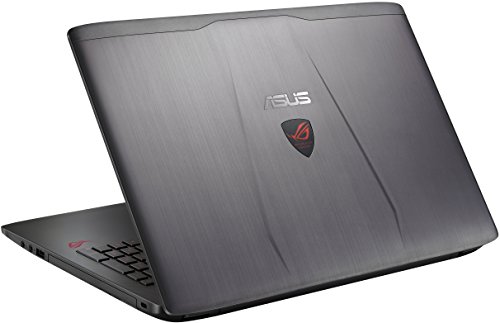
- Best for: Players who want an ASUS ROG machine with a DVD burner and large memory.
- 15.6-inch Full HD display, 1920 x 1080
- Intel Core i7-6700HQ processor, 2.6GHz
- NVIDIA GeForce GTX 960M graphics, 2GB
- 16GB DDR4 RAM
All 4 Picks at a Glance
| Product | Specs | Action |
|---|---|---|
| MSI GE62 Apache Pro-239 |
| Check price on Amazon |
| MSI GE62 Apache Pro-004 |
| Check price on Amazon |
| ASUS ROG GL552VW-DH71 |
| Check price on Amazon |
 MSI GL72 6QD-001 |
| Check price on Amazon |
Key takeaways
- Four older gaming laptops with built-in DVD drives, compared by graphics card, memory, storage and screen size, with honest notes on renewed listings.
Buying a gaming laptop with a DVD drive is really a decision about keeping a disc library usable, not about chasing the newest graphics card. Modern gaming laptops dropped the optical drive years ago, so the search leads back to older machines that still have one built into the chassis. That trade is the heart of this guide: every laptop here can read and write discs without an external drive attached, and every one of them is an older model with older graphics and a mechanical hard drive.
This guide is for players with disc-based game collections, people reinstalling older titles from disc, and anyone who still watches films on DVD on the same machine they game on. Every pick below was chosen from the name and specifications stated on its Amazon listing, and each listing names a built-in DVD drive rather than an add-on. Because these are older models, check the condition stated on the listing before ordering.
Quick Picks
As an Amazon Associate we earn from qualifying purchases
| Product | Best for | Key spec from title |
|---|---|---|
| MSI GE62 Apache Pro-239 | Strongest graphics in the guide for a disc library | GeForce GTX 970M, Intel Core i7-6700HQ, 12GB RAM |
| MSI GE62 Apache Pro-004 | More memory for multitasking while gaming | GeForce GTX 960M, Intel Core i7-6700HQ, 16GB RAM |
| ASUS ROG GL552VW-DH71 | A large-memory machine with a DVD burner | GeForce GTX 960M 2GB VRAM, 16GB DDR4, 1TB |
| MSI GL72 6QD-001 | The largest screen in the guide | GeForce GTX 950M, Intel Core i5-6300HQ, 17.3-inch display |
How to Choose
Confirm the drive is built in, not bundled
The first check is the wording on the listing itself. Look for SuperMulti DVD, DVD Super Multi, DVD+RW, or DVD burner in the specifications, because those phrases describe a drive fitted inside the chassis. A listing that says no optical drive, or one that pictures an external drive in the box, does not meet this guide. Model families vary by configuration, so confirm the exact configuration named on the listing you are about to order, since a sibling model with a similar name can ship without a drive fitted.
Match the graphics card to the disc-era games you play
The graphics cards in this guide come from the same era as the DVD drive, so they suit the games of that period rather than the most demanding recent releases. The GeForce GTX 970M in the Pro-239 sits a tier above the GTX 960M in the Pro-004 and the ASUS ROG, while the GTX 950M in the GL72 is the lightest card here. All four drive a Full HD display, which keeps the workload in line with what these cards were built for. Check the requirements of the specific games on your discs before choosing a tier.
Weigh memory and storage for a disc library
Memory and storage decide how comfortably these older machines handle a library installed from disc. Sixteen gigabytes of RAM, as listed for the Pro-004 and the ASUS ROG, leaves more room for a game plus background apps than the twelve gigabytes in the Pro-239 or the eight gigabytes in the GL72. Every pick here lists a 1TB mechanical hard drive, which holds many disc installs but loads more slowly than a solid-state drive. If you install from disc often, the larger memory and the 7200 rpm drive speed matter more than small differences elsewhere.
Check condition, age, and the operating system
Every laptop in this guide is a 2016-era model, so the listing condition deserves as much attention as the specifications. These machines are long out of production, which means Amazon listings are likely to come from third-party sellers or renewed stock rather than new retail inventory. Read the condition stated on the listing, confirm the exact configuration, and confirm that Windows 10 is the operating system named. Also check the return terms, because a worn battery or a tired drive is far more likely on a machine of this age than on a current model.
The 4 Best Options
MSI GE62 Apache Pro-239
- Best for: Players whose disc library includes the most demanding titles of this era.
- 15.6-inch Full HD display, 1920 x 1080
- Intel Core i7-6700HQ processor, 2.6GHz
- NVIDIA GeForce GTX 970M graphics
- 12GB DDR4 RAM
Players whose disc library includes the most demanding titles of this era.
This is a 2016-era model, so confirm the listing condition and the exact configuration before ordering.
The Pro-239 is the pick for a player whose disc library leans on the most demanding titles of its era, because its GeForce GTX 970M is the strongest graphics card in this guide. Its Intel Core i7-6700HQ processor and 12GB of DDR4 memory give it room to run a game alongside chat and a browser, while the 1TB hard drive holds a large collection of disc installs. The built-in DVD+RW drive reads and writes discs, so older game installs and films on DVD work without an external drive on the desk.
Watch out for: This is a 2016-era model, so confirm the listing condition and the exact configuration before ordering.
MSI GE62 Apache Pro-004
- Best for: Multitasking players who want the most memory in this guide.
- 15.6-inch Full HD display, 1920 x 1080
- Intel Core i7-6700HQ processor, 2.6GHz
- NVIDIA GeForce GTX 960M graphics, 2GB GDDR5
- 16GB DDR4 RAM, 2133MHz
Multitasking players who want the most memory in this guide.
The GTX 960M sits a tier below the Pro-239 graphics card, so weigh memory against graphics before choosing.
The Pro-004 suits a player who keeps several apps open while gaming, because its 16GB of DDR4 memory is the largest in this guide alongside the ASUS ROG. Its Intel Core i7-6700HQ processor pairs with a GeForce GTX 960M graphics card, a combination that handles disc-era titles at Full HD without strain. The SuperMulti DVD drive reads and writes discs, and the 1TB hard drive gives a disc collection plenty of room. The SteelSeries backlit keyboard and the 15.6-inch Full HD display round out a machine built for long sessions at a desk.
Watch out for: The GTX 960M sits a tier below the Pro-239 graphics card, so weigh memory against graphics before choosing.
ASUS ROG GL552VW-DH71
- Best for: Players who want an ASUS ROG machine with a DVD burner and large memory.
- 15.6-inch Full HD display, 1920 x 1080
- Intel Core i7-6700HQ processor, 2.6GHz
- NVIDIA GeForce GTX 960M graphics, 2GB
- 16GB DDR4 RAM
Players who want an ASUS ROG machine with a DVD burner and large memory.
Confirm the listing names this exact DH71 configuration, since the GL552 family shipped in several variants.
The ASUS ROG GL552VW-DH71 fits a player who wants a Republic of Gamers machine with a disc burner and generous memory. Its Intel Core i7-6700HQ processor and 16GB of DDR4 memory match the Pro-004 for multitasking, and its GeForce GTX 960M graphics card handles disc-era games at Full HD. The DVD+/-RW DL drive reads and writes discs, including dual-layer media, and the 1TB hard drive holds a large installed library. The 15.6-inch Full HD display and the ROG chassis give it a distinct look beside the three MSI machines in this guide.
Watch out for: Confirm the listing names this exact DH71 configuration, since the GL552 family shipped in several variants.
MSI GL72 6QD-001
- Best for: Desk-based players who want the largest screen in the guide.
- 17.3-inch Full HD display, 1920 x 1080
- Intel Core i5-6300HQ processor, 2.3GHz
- NVIDIA GeForce GTX 950M graphics, 2GB
- 8GB DDR4 RAM
Desk-based players who want the largest screen in the guide.
It has the lightest graphics card and the least memory here, so it suits lighter disc-era games best.
The GL72 6QD-001 is the pick for a player who games at a desk and wants the biggest screen here, because its 17.3-inch Full HD display is larger than the 15.6-inch panels on the other three picks. Its Intel Core i5-6300HQ processor and GeForce GTX 950M graphics card sit a tier below the rest of the guide, so it suits less demanding disc-era titles rather than the heaviest games of the period. The SuperMulti DVD burner reads and writes discs, and the 1TB hard drive and 8GB of memory cover a modest installed library.
Watch out for: It has the lightest graphics card and the least memory here, so it suits lighter disc-era games best.
Which One Fits Your Situation
You want the strongest graphics for demanding disc-era games
Choose the MSI GE62 Apache Pro-239. Its GeForce GTX 970M is the strongest card in this guide, and its i7-6700HQ processor keeps up with the most demanding titles of the period. The 12GB of memory is less than the 16GB in two rivals, but for raw game performance on disc-era titles, the graphics advantage matters more.
You multitask heavily while you game
Choose the MSI GE62 Apache Pro-004 or the ASUS ROG GL552VW-DH71. Both list 16GB of DDR4 memory, the most in this guide, alongside an i7-6700HQ processor and a GTX 960M card. Pick the Pro-004 for the MSI keyboard and chassis, or the ASUS ROG for its distinct design and dual-layer DVD burner.
You install and watch a lot of discs
Choose any pick whose drive wording matches your media, but the ASUS ROG GL552VW-DH71 stands out here. Its listing names a DVD+/-RW DL drive, which covers dual-layer discs as well as standard ones. The Pro-239, Pro-004, and GL72 all list DVD writing too, so any of the four handles ordinary game installs and films.
You game at a desk and want the biggest screen
Choose the MSI GL72 6QD-001. Its 17.3-inch Full HD display gives the largest picture in the guide, which suits a fixed desk setup where the extra size and weight do not matter. Accept the trade: the GTX 950M graphics and 8GB of memory suit lighter disc-era titles rather than the heaviest games.
Common Mistakes
- Buying a modern gaming laptop and assuming it has a DVD drive, when current models have dropped the optical drive entirely.
- Ordering a sibling configuration of the same model family without checking that the listing names a DVD drive.
- Judging these machines by current graphics tiers instead of matching the card to the disc-era games you actually own.
- Ignoring the listing condition on a 2016-era model, then finding the battery or the drive is worn.
- Filling the 1TB hard drive with disc installs and leaving no room for game updates and save files.
Frequently Asked Questions
Do any new gaming laptops still have built-in DVD drives?
Almost none do. Laptop makers removed the optical drive to make machines thinner and lighter, and recent gaming laptops ship without one. That is why every pick in this guide is an older model from the era when a DVD drive was still standard. If a current-model listing claims a built-in drive, read the specifications closely before trusting it.
Can these laptops play modern games?
They handle disc-era titles well, but they struggle with the most demanding recent releases. The GTX 970M, GTX 960M, and GTX 950M cards were built for the games of their period at Full HD, and modern titles often need far more graphics power. Check the system requirements of each game you own before buying, and expect older titles to run far better than new ones.
Will the DVD drive read and burn discs?
Yes, according to the specifications stated on each listing. The Pro-239 lists a DVD+RW drive, the Pro-004 and GL72 list a SuperMulti DVD drive or burner, and the ASUS ROG lists a DVD+/-RW DL drive. All four are described as drives that both read and write discs. Confirm the exact drive wording on the listing you order, since configurations vary within a model family.
Should I buy a renewed or third-party listing?
It depends on the condition stated on the listing. These models are out of production, so renewed or third-party stock is the realistic way to find one. Read the condition note, check the seller and the return terms, and confirm the exact configuration and the Windows 10 operating system named. If the listing is vague about condition or configuration, look for one that states both clearly.