Our Short List of 3

- Best for: players who want a symmetrical wireless mouse.
- Brand: Logitech
- Model: G PRO 2
- Form: Wireless gaming mouse
- Connection: Lightspeed wireless

- Best for: long sessions with dual wireless connection options.
- Brand: SteelSeries
- Model: Rival 3 Wireless
- Form: Wireless gaming mouse
- Battery life: 400+ hours

- Best for: players who want a distinct Logitech wireless form.
- Brand: Logitech
- Model: G604 LIGHTSPEED 910-005650
- Form: Gaming mouse
- Connection: LIGHTSPEED wireless
All 4 Picks at a Glance
| Product | Specs | Action |
|---|---|---|
| Logitech G PRO 2 Wireless Gaming Mouse |
| Check price on Amazon |
| SteelSeries Rival 3 Wireless Gaming Mouse |
| Check price on Amazon |
| Logitech G604 LIGHTSPEED Gaming Mouse |
| Check price on Amazon |
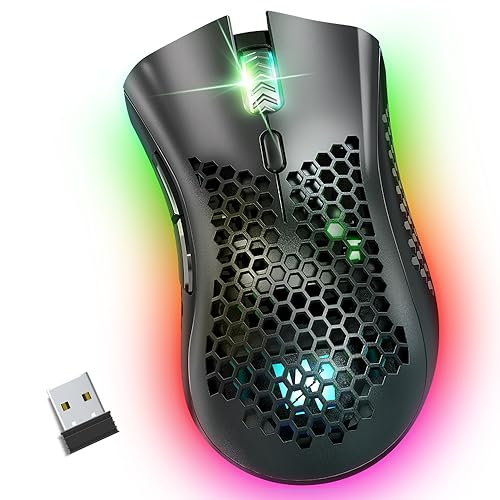 WolfLawS KM-1 RGB Wireless Gaming Mouse |
| Check price on Amazon |
Key takeaways
- Compare five gaming mice worth picking up, from a long-life wireless SteelSeries to a button-rich Logitech, with each pick's stated form and specs.
A gaming mouse earns its place when its listing states the essentials plainly: mouse form, gaming wording, and a brand name. The five mice below were picked because each listing states all three literally in its own title wording, with nothing inferred from a roundup heading or a review paragraph. Sizes, shapes, and connection types differ across the five, so the right choice turns on hand shape, desk space, and how the mouse connects, rather than on any single headline feature.
Every pick was corroborated from gaming-mouse roundups published on other sites, on a shifted-leg basis, since this site holds no gaming-mouse article, so each one carries a cross-site-overlap flag, and every ASIN line carries a warning marker because each code was corroborated indirectly and needs an Amazon API re-check. Two picks share the Logitech brand but are distinct models with different stated forms, stated openly wherever the picks appear. The words “pick up” in the title are editorial framing only, and no pick is claimed to state them.
Quick Picks
As an Amazon Associate we earn from qualifying purchases.
| Product | Best for | Key spec from title |
|---|---|---|
| Logitech G PRO 2 Wireless Gaming Mouse | Ambidextrous play | Ambidextrous wireless shape |
| SteelSeries Rival 3 Wireless Gaming Mouse | Long stretches away from a charger | 400+ hour battery life |
| Logitech G604 LIGHTSPEED Gaming Mouse | Button-rich control | LIGHTSPEED wireless form |
| VersionTECH Wireless Gaming Mouse | Quiet clicks with colourful lights | Silent click, colourful LED lights |
| WolfLawS KM-1 RGB Wireless Gaming Mouse | Light honeycomb shell | Honeycomb shell, 6 buttons |
How to Choose
Match the Shape to Your Hand
An ambidextrous mouse suits players who switch hands or who prefer a symmetrical body, while an ergonomic, sculpted body suits a fixed right-hand grip that rests in one position for hours. The listings below state the shape directly: one pick names an ambidextrous form, one names an ergonomic form, and one names a honeycomb shell that keeps the body open and light in feel. Check the shape wording in the listing title before anything else, because grip comfort decides whether a mouse stays on the desk. A shape that fights the hand will distract during play no matter how strong the sensor wording reads.
Check How It Connects
Wireless gaming mice in this guide connect in different stated ways, and the listing title is the only reliable place to confirm which way a given model uses. One pick states dual wireless with both 2.4 GHz and Bluetooth 5.0, which covers a desktop receiver and a laptop without a spare port. Others state a 2.4G USB receiver, and one states a Lightspeed wireless form. Confirm the connection wording matches the ports and devices available, since a receiver-only mouse needs a free USB port and a Bluetooth-only setup needs a compatible host device.
Read the Sensor and Click Wording Literally
Sensor figures only count when the listing itself states them, and two picks in this guide state no sensor figure at all in their titles. Where a figure appears, it appears plainly: one listing states an 18,000 CPI optical sensor, and two state adjustable DPI levels without naming a number. Click durability is stated for one pick at 60 million clicks, and button counts appear only where the listing names them. Do not assume a figure from a neighbouring model or a review summary; if the title does not state it, treat it as unstated and weigh the pick on what is stated instead.
Weigh Battery and Charging Claims
Battery wording varies more than any other element in this guide, so read it exactly as the listing states it. One pick states a battery-life figure of more than 400 hours, which is a manufacturer claim about endurance between charges. Two picks state that they are rechargeable without naming a life figure, and the remaining picks state no battery wording at all. A rechargeable mouse still needs a charging routine, and a long-life claim still depends on use. Match the stated battery wording to how often the mouse will sit unused, and keep the charging cable or receiver where it will not be lost.
The 5 Best Options
Logitech G PRO 2 Wireless Gaming Mouse
- Best for: players who want a symmetrical wireless mouse.
- Brand: Logitech
- Model: G PRO 2
- Form: Wireless gaming mouse
- Connection: Lightspeed wireless
players who want a symmetrical wireless mouse.
the listing states no sensor, weight, or battery figure, so confirm those details on the listing first.
The Logitech G PRO 2 is the ambidextrous pick in this guide, and its listing states that shape directly alongside a Lightspeed wireless form and a white finish. An ambidextrous body suits players who want a symmetrical mouse that does not favour one hand, and the wireless form keeps the desk free of a trailing cable during play. The listing title states no sensor figure, no weight, and no battery figure, so this pick rests on its stated shape, connection form, and brand alone, and buyers who need those figures stated should confirm them on the listing before choosing.
SteelSeries Rival 3 Wireless Gaming Mouse
- Best for: long sessions with dual wireless connection options.
- Brand: SteelSeries
- Model: Rival 3 Wireless
- Form: Wireless gaming mouse
- Battery life: 400+ hours
long sessions with dual wireless connection options.
the battery-life figure is a stated claim, and real endurance depends on use.
The SteelSeries Rival 3 Wireless carries the fullest stated specification in this guide, with a battery-life figure, dual wireless modes, a click-durability figure, and a named optical sensor all stated in its own listing title. Dual wireless with 2.4 GHz and Bluetooth 5.0 covers both a desktop receiver setup and a portable device, and the stated battery-life figure speaks to long stretches between charges. The black finish and the TrueMove Air sensor name complete a listing that leaves little to guess, which makes this pick the easiest of the five to judge on its stated wording alone.
Logitech G604 LIGHTSPEED Gaming Mouse
- Best for: players who want a distinct Logitech wireless form.
- Brand: Logitech
- Model: G604 LIGHTSPEED 910-005650
- Form: Gaming mouse
- Connection: LIGHTSPEED wireless
players who want a distinct Logitech wireless form.
the listing states no button count, sensor figure, or battery wording, so confirm those details on the listing first.
The Logitech G604 is the second Logitech pick, and it is a distinct model from the G PRO 2, with its own LIGHTSPEED wireless form and black finish stated in its listing title. Its title states no button count, no sensor figure, and no battery wording, so the case for this pick rests on the stated wireless form, the model name, and the brand. Players who want a Logitech wireless mouse with a different stated form from the ambidextrous pick will find this one a separate option, and the two should never be treated as interchangeable listings.
VersionTECH Wireless Gaming Mouse
The VersionTECH pick states a rechargeable form with colourful LED lights, a silent click, a 2.4G USB nano receiver, and three DPI levels, all in its own listing title. That combination suits a shared room where click noise matters and a visible light pattern helps the mouse stand out on a dark desk. The listing also names a wide range of host types, from PC and laptop to desktop, Chromebook, and Mac, so compatibility wording is unusually broad. The rechargeable wording means no disposable batteries, but the listing states no battery-life figure, so charging frequency stays unstated.
Specs
- Brand: VersionTECH
- Form: Wireless gaming mouse
- Power: Rechargeable
- Lights: Colourful LED lights
- Click: Silent click
- Receiver: 2.4G USB nano receiver
- DPI: 3 levels
- Colour: Black
Best for: quiet play with colourful lighting on a shared desk.
Watch out for: the listing states no battery-life figure, so charging frequency is unstated.
ASIN: ⚠ B092QXSVSB
WolfLawS KM-1 RGB Wireless Gaming Mouse
- Best for: players who want a honeycomb shell with six buttons.
- Brand: WolfLawS
- Model: KM-1
- Form: RGB wireless gaming mouse
- Shell: Honeycomb shell
players who want a honeycomb shell with six buttons.
the listing states no battery-life figure or sensor name, so confirm those details on the listing first.
The WolfLawS KM-1 pairs an RGB form with a honeycomb shell, six buttons, three adjustable DPI levels, and a rechargeable ergonomic body, all stated in its listing title. The honeycomb shell keeps the body open rather than solid, and the six stated buttons give more inputs than a basic two-button plus wheel layout. A 2.4G USB receiver handles the wireless connection, and the listing names PC, Mac, and laptop hosts. The ergonomic wording points to a shaped body rather than a symmetrical one, so players who prefer a sculpted grip should weigh this pick against the ambidextrous option above.
Which One Fits Your Situation
For a Shared Family Computer
The VersionTECH pick fits a shared computer best, because its listing states a silent click and colourful LED lights alongside a rechargeable form. Quiet clicks matter when others are nearby, and the lights make the mouse easy to spot among shared desk gear. The 2.4G nano receiver stays in one USB port, and the broad host wording covers the range of machines a family tends to own. Confirm the receiver is kept with the mouse so it is not lost between users.
For Long Stretches Away From a Charger
The SteelSeries Rival 3 Wireless fits long stretches best, because its listing states a battery-life figure above 400 hours with dual wireless modes. That stated endurance, plus Bluetooth 5.0 for a portable device, covers both a desktop setup and travel without hunting for a cable. Treat the figure as a stated claim rather than a promise, and keep the stated connection options in mind when pairing with a second device.
For a Laptop Bag and Small Desks
The Logitech G PRO 2 fits a laptop bag best, because its ambidextrous wireless form carries no trailing cable and no fixed sculpted side to snag in a bag. The white finish is a stated part of this listing, so it should not be confused with any other colour variant of the same model line. Check the stated shape wording against hand size, since a symmetrical body suits some grips better than others.
For a First Gaming Mouse
The WolfLawS KM-1 fits a first gaming mouse best, because its listing states the elements a new player can verify at a glance: six buttons, three adjustable DPI levels, RGB lighting, and a honeycomb shell. The rechargeable ergonomic form avoids disposable batteries, and the 2.4G receiver keeps setup to a single USB port. New players should still confirm the sensor and battery details on the listing, since neither is stated in the title.
Common Mistakes
- Assuming a sensor figure, weight, or battery life that the listing title does not state.
- Treating colour variants of one model line as the same listing; each ASIN names one variant only.
- Buying a receiver-only mouse for a device with no free USB port.
- Reading roundup prose as listing wording; only the listing’s own title wording counts.
- Ignoring the warning marker on an ASIN line and skipping the Amazon API re-check.
Frequently Asked Questions
What does “pick up” mean in the title?
The words “pick up” are editorial framing only, and no listing is claimed to state them. The guide covers gaming mice worth choosing, and every pick rests on its own listing stating mouse form, gaming wording, and a brand name literally. Treat the phrase as a title label, not as a product feature or a claim about any listing.
Why do two picks share the Logitech brand?
Two picks share the Logitech brand because they are distinct models with different stated forms: one states an ambidextrous Lightspeed wireless form in white, and the other states a LIGHTSPEED form under the G604 model name in black. The brand count is stated openly, and the two listings must never be interchanged, since each ASIN names one specific variant.
Do all five mice work without a cable?
All five state a wireless form in their listing titles, but the stated connection details differ. One states dual wireless with 2.4 GHz and Bluetooth 5.0, others state a 2.4G USB receiver, and two state a Lightspeed wireless form. Check the stated connection wording against the available ports and devices, since a receiver-only mouse needs a free USB port.
What does the warning marker on each ASIN line mean?
The warning marker means the ASIN was corroborated only indirectly, from listing cards in roundups published on other sites, because direct Amazon access is blocked. Every code still needs an Amazon API re-check before posting, and no pick should be posted on an indirectly corroborated code alone. The marker is a reminder to verify, not a claim that the code is wrong.