Our Short List of 3
All 5 Picks at a Glance
| Product | Specs | Action |
|---|---|---|
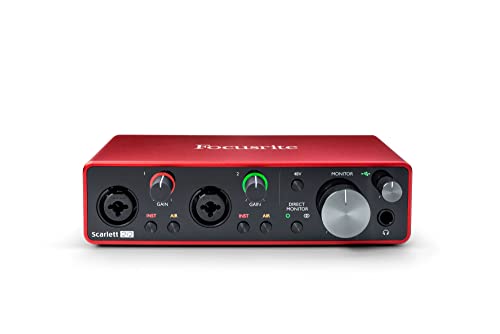 Focusrite Scarlett 2i2 3rd Gen | Check price on Amazon | |
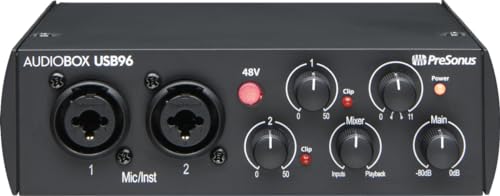 PreSonus AudioBox USB 96 25th Anniversary | Check price on Amazon | |
 Behringer U-Phoria UMC202HD | Check price on Amazon | |
 Behringer U-Phoria UMC22 | Check price on Amazon | |
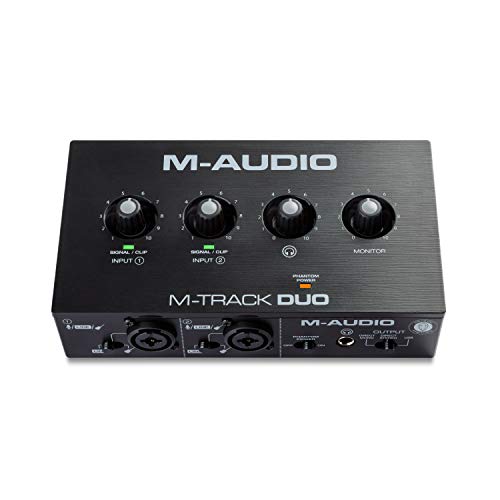 M-Audio M-Track Duo | Check price on Amazon |
Key takeaways
- Find the best USB sound cards for recording vocals, guitar, and podcasts. Compare top USB audio interfaces with mic preamps and low-latency monitoring.
Introduction
Finding the best USB sound cards for recording can feel confusing, because the term covers two related but different kinds of hardware. Some products are simple USB sound cards that add a headphone jack and microphone input to a laptop, while others are full USB audio interfaces with proper microphone preamps, phantom power, and instrument inputs. For recording vocals, guitar, or a podcast, the second kind is almost always the better choice, and that is what this guide focuses on.
A good USB recording interface replaces a computer’s built-in sound chip with cleaner converters, quieter preamps, and lower latency, so what you hear while recording matches what is actually being captured. Whether you are setting up a first home studio, recording voiceovers, tracking acoustic guitar, or starting a two-person podcast, the right interface makes the whole process smoother and the results easier to mix.
This guide compares five USB audio interfaces for recording, from an ultra-compact budget model to the best-selling two-channel interface in its class. Each one connects over USB, works with major recording software on Mac and Windows, and includes at least one microphone preamp with phantom power for condenser microphones.
At a Glance
| Product | Best For | Key Spec |
|---|---|---|
| Focusrite Scarlett 2i2 3rd Gen | Best overall recording quality | 24-bit/192 kHz, two mic preamps, Air mode |
| PreSonus AudioBox USB 96 | Best two-person podcast setup | 24-bit/96 kHz, two Class-A preamps, MIDI I/O |
| Behringer U-Phoria UMC202HD | Best value two-preamp interface | 24-bit/192 kHz, two MIDAS preamps |
| Behringer U-Phoria UMC22 | Tightest budget, single microphone | 16-bit/48 kHz, one MIDAS preamp |
| M-Audio M-Track Duo | Most portable beginner interface | 24-bit/48 kHz, two combo inputs, USB powered |
How to Choose a USB Sound Card for Recording
Number of inputs. Count how many sources you need to record at the same time. A solo vocalist or guitarist needs only one microphone input, but a two-person podcast, a singer who plays guitar, or a stereo recording setup needs two. All five interfaces in this guide offer two inputs except the Behringer UMC22, which has one microphone input and one instrument input.
Microphone preamp quality and gain. The preamp boosts a microphone’s quiet signal to a usable level, and a noisy or weak preamp is one of the most common reasons home recordings sound thin or hissy. Look for a stated gain range and a clean reputation. The Focusrite Scarlett 2i2 3rd Gen offers up to 60 dB of gain with a switchable Air mode that adds brightness to vocals and acoustic instruments, while the Behringer UMC202HD and PreSonus AudioBox USB 96 use well-regarded MIDAS-designed and Class-A preamps respectively. Quiet dynamic microphones need more gain than condenser microphones, so gain matters most if you plan to use a dynamic mic.
Resolution: bit depth and sample rate. Most interfaces in this guide record at 24-bit resolution, which gives more headroom for quiet passages and loud peaks than 16-bit recording. Sample rates of 48 kHz and above are standard for music and podcast work, and 96 kHz or 192 kHz support gives extra flexibility for detailed projects. In practice, 24-bit/48 kHz is enough for most home recording, and higher rates matter mainly for demanding production work.
Phantom power. Condenser microphones need 48V phantom power supplied through the XLR cable, and every interface here provides it. If you already own a condenser microphone, or plan to buy one, confirm the interface has a phantom power switch. Dynamic microphones do not need phantom power, but having the option costs nothing and keeps your options open.
Direct monitoring and latency. Direct monitoring lets you hear your microphone signal straight through the interface with no delay, instead of waiting for the sound to travel through the computer and back. Every model in this guide offers some form of zero-latency direct monitoring, either with a dedicated switch or a mixer control that blends the input signal with playback from the computer. This matters most when recording vocals or instruments while listening to a backing track.
Software and connectivity. Most interfaces include recording software and plug-ins, which can save a beginner from buying a separate digital audio workstation. The Scarlett 2i2 includes Pro Tools First and the Hitmaker Expansion bundle, the AudioBox USB 96 includes Studio One Artist and Ableton Live Lite, and the M-Track Duo includes MPC Beats and a set of effects and virtual instruments. Also check the USB connection type, since newer models use USB-C and older designs use USB-B.
Product Reviews
Focusrite Scarlett 2i2 3rd Gen
The Focusrite Scarlett 2i2 3rd Gen is the most popular USB audio interface in its class, and it earns that position with a combination of clean preamps, straightforward controls, and a generous software bundle. It is a 2-in/2-out interface with two combo mic/line/instrument inputs, so it can record two microphones, a microphone and a guitar, or two instruments at the same time.
Key specifications include 24-bit/192 kHz converters, third-generation Scarlett mic preamps with up to 60 dB of gain, switchable Air mode for added brightness on vocals and acoustic instruments, two balanced line outputs, a headphone output with independent volume control, and USB-C bus power, so no external power supply is needed. It measures about 7.68 x 2.09 x 1.32 inches and weighs around 1.1 pounds. Gain Halo metering around the gain knobs shows at a glance whether a signal is too quiet, healthy, or clipping.
This interface suits singers, songwriters, podcasters, and streamers who want reliable studio-quality recordings without a complicated setup. The included software, including Pro Tools First and the Hitmaker Expansion bundle, means a beginner can start recording right away. The main limitation is the two-input ceiling: it cannot record a full drum kit or a larger group in one pass, and the 3rd Gen model lacks some of the newer auto-gain features found on the later generation.
Pros:
– Clean, quiet preamps with Air mode for vocals and acoustic guitar
– 24-bit/192 kHz recording with 119 dB dynamic range
– Simple controls with helpful Gain Halo metering
– Bus powered over USB-C with no external adapter
– Strong included software bundle
Cons:
– Only two inputs, so no multi-microphone drum recording
– No MIDI ports for keyboards or controllers
– No auto-gain feature on this generation
PreSonus AudioBox USB 96 25th Anniversary
The PreSonus AudioBox USB 96 25th Anniversary edition is a rugged 2-in/2-out USB audio interface built around two Class-A microphone preamps, and it is one of the few entry-level interfaces that also includes MIDI In/Out ports. That combination makes it a strong pick for a two-person podcast or a small music setup that includes a keyboard controller or synthesizer.
Key specifications include 24-bit/96 kHz converters, two front-panel combo mic/instrument inputs with Class-A preamps, switchable 48V phantom power, a mixer control that blends input and playback for zero-latency monitoring, two balanced TRS main outputs, a quarter-inch headphone output, and USB bus power. The interface weighs about 2 pounds and comes with Studio One Artist, Ableton Live Lite, and the Studio Magic plug-in suite.
This interface is best for podcasters recording two hosts at one desk, and for musicians who need MIDI alongside their audio inputs. The two preamps and the hardware monitor blend make two-person recording straightforward, and the bundled Studio One Artist software is a capable full digital audio workstation. Owner feedback is generally positive about sound quality and ease of setup, though some owners report crackling sounds or configuration frustration, and compatibility with GarageBand has drawn mixed comments.
Pros:
– Two Class-A mic preamps with 48V phantom power
– MIDI In/Out for keyboards and controllers, rare at this level
– Zero-latency hardware monitoring with mixer control
– Includes Studio One Artist and Ableton Live Lite
– Rugged all-metal chassis
Cons:
– 96 kHz maximum sample rate, lower than 192 kHz rivals
– Uses an older USB-B connection rather than USB-C
– Some owners report crackling or setup difficulties
Behringer U-Phoria UMC202HD
The Behringer U-Phoria UMC202HD packs two MIDAS-designed microphone preamps and 24-bit/192 kHz conversion into one of the most affordable two-preamp interfaces available, making it a standout value for home recording. It is a 2-in/2-out USB 2.0 interface aimed squarely at singers, songwriters, and podcasters who want two proper microphone inputs without paying for a premium brand name.
Key specifications include audiophile 24-bit/192 kHz resolution, two combination XLR/TRS inputs with MIDAS-designed mic preamps, switchable 48V phantom power, a direct monitoring mix control for zero-latency listening, separate output and headphone level controls, and USB bus power. The unit measures about 25.2 x 15.8 x 8.8 cm and weighs around 540 grams.
This interface suits budget-conscious recordists who need two microphone inputs for a podcast, a vocal-and-guitar session, or stereo recording. The pad switches on the inputs help with loud sources, and the separate level controls for speakers and headphones are a practical touch. The main trade-offs are its older USB 2.0 design, a more modest preamp gain range that can struggle with very quiet dynamic microphones on soft sources, and the absence of loopback or MIDI. Some owners also report hum or hiss in certain setups, so cable quality and gain staging matter.
Pros:
– Two MIDAS-designed preamps with 24-bit/192 kHz conversion
– Pad switches for loud sources, unusual at this level
– Separate level controls for speakers and headphones
– Direct monitoring with no audible delay
– Very affordable for a two-preamp interface
Cons:
– Older USB 2.0 design with no loopback feature
– Modest preamp gain range for quiet dynamic microphones
– No MIDI ports
– Some owners report noise issues in their recordings
Behringer U-Phoria UMC22
The Behringer U-Phoria UMC22 is the cheapest genuine USB audio interface in this guide, and it is the right choice when the budget is extremely tight and only one microphone needs to be recorded at a time. It is a 2×2 interface with one MIDAS-designed microphone preamp and one instrument input, aimed at solo vocalists, guitarists, and first-time podcasters.
Key specifications include 16-bit/48 kHz resolution, a MIDAS-designed mic preamp with 48V phantom power, a separate instrument input for guitar or bass, direct monitoring for latency-free listening, a headphone output, and USB bus power in a compact metal chassis. It works with major recording software on Windows and macOS and is small enough to slip into a bag alongside a laptop.
This interface suits a beginner recording one voice or one instrument, or anyone who wants a spare interface for travel. The single microphone preamp is its defining limitation: it cannot record two microphones at once, so a two-person podcast would need a different model. The 16-bit/48 kHz resolution is also a step below the 24-bit converters in the other interfaces here, which means less headroom when recording quiet sources. For a solo setup on a minimal budget, though, it delivers the essentials — a real preamp, phantom power, and direct monitoring — at a fraction of the cost of larger interfaces.
Pros:
– Lowest cost genuine USB interface with a real mic preamp
– MIDAS-designed preamp with 48V phantom power
– Direct monitoring and headphone output included
– Compact metal chassis, easy to carry
– Simple setup with no external power needed
Cons:
– Only one microphone input, so no two-person recording
– 16-bit/48 kHz resolution, lower than 24-bit rivals
– No MIDI ports and no second preamp
– Basic feature set with no loopback
M-Audio M-Track Duo
The M-Audio M-Track Duo is a compact, portable 2-channel USB audio interface designed as a starting point for recording, podcasting, and producing music on a Mac, PC, or mobile device. Its small footprint and USB power make it one of the easiest interfaces in this guide to carry between rooms or take on the road.
Key specifications include 24-bit/48 kHz recording, two combo XLR/line inputs with Crystal preamps, switchable 48V phantom power, line and instrument switches on each input, a headphone output, main outputs, and a USB connection that powers the whole unit. The included software suite features MPC Beats, AIR effects, and virtual instruments including TubeSynth, Electric, and Bassline, giving a beginner a complete set of tools for making music as well as recording it.
This interface suits beginners and mobile creators who want two microphone inputs in the smallest, simplest package possible. Clearly labeled knobs and signal/clip LEDs make setting levels easy. The main limitations are the 48 kHz maximum sample rate, which is lower than the 96 kHz and 192 kHz models here, and a fairly basic feature set with no MIDI and no loopback. Some owners have also reported units stopping working after several months, so keeping the receipt and checking the warranty terms is sensible.
Pros:
– Two combo inputs with Crystal preamps and phantom power
– Very compact and fully USB powered for portability
– Clear, beginner-friendly front-panel controls
– Generous included software suite for music production
– Works with Mac, PC, iOS, and Android
Cons:
– 48 kHz maximum sample rate, lower than rivals
– No MIDI ports and no loopback feature
– Mixed owner reports on long-term reliability
Which One Fits You
The right choice depends on how many microphones you need and how much you want to spend. For the best overall recording quality in a two-input interface, the Focusrite Scarlett 2i2 3rd Gen is the safest pick, with the cleanest preamps and the most polished software bundle in this group. Podcasters recording two hosts should look at the PreSonus AudioBox USB 96, which adds MIDI and a hardware monitor blend, or the Behringer UMC202HD, which offers similar two-preamp recording with higher 192 kHz resolution at a lower cost.
If the budget is the deciding factor, the choice comes down to how many microphones you need. The Behringer UMC22 covers a single microphone or instrument for the least money, while the M-Audio M-Track Duo adds a second microphone input, a more complete software suite, and a more portable design for only a modest step up. Whatever you choose, correct gain staging matters more to the final recording than the difference between any two interfaces here.
FAQ
Is a USB sound card the same as an audio interface?
The terms overlap, but they are not identical. A basic USB sound card usually adds a headphone jack and a microphone input to a computer, while a USB audio interface adds proper microphone preamps, phantom power, instrument inputs, and low-latency monitoring. For recording vocals or instruments, an audio interface is the better tool, and every product in this guide is an interface rather than a basic sound card.
Do I need phantom power to record?
You need 48V phantom power if you use a condenser microphone, which is the most common type for vocals, voiceover, and acoustic instruments. Dynamic microphones, including popular podcast microphones, do not need phantom power. Every interface in this guide includes a phantom power switch, so either microphone type works.
How many inputs do I need for recording?
One input is enough for a solo vocalist, guitarist, or voiceover artist. Two inputs cover a two-person podcast, a singer with a guitar, or a stereo microphone setup. If you plan to record drums or a full band, you will need an interface with four or more inputs, which is beyond the scope of this guide.
What sample rate should I record at?
A sample rate of 48 kHz at 24-bit resolution is the standard choice for music, podcasting, and video work, and every interface here supports at least that. Higher rates such as 96 kHz or 192 kHz give more detail for demanding production work, but they also create larger files and use more computer processing power.
Can I use a USB audio interface with a laptop?
Yes. All five interfaces here are bus powered over USB, so they draw power from the computer and need no separate power adapter. They work with major recording software on Windows and macOS, and the M-Audio M-Track Duo also works with iOS and Android devices.
Do these interfaces work with podcasting software?
Yes. They appear to recording and streaming software as standard audio devices, so they work with popular podcasting, streaming, and video conferencing applications as well as full digital audio workstations.
Conclusion
The best USB sound cards for recording are really USB audio interfaces, and the five models in this guide cover the main needs of home recordists. The Focusrite Scarlett 2i2 3rd Gen leads on overall quality, the PreSonus AudioBox USB 96 is the strongest choice for two-person podcasts with MIDI gear, the Behringer UMC202HD offers the best value in a two-preamp interface, the Behringer UMC22 is the most affordable way to start with a single microphone, and the M-Audio M-Track Duo is the most portable beginner option. Pick the one that matches how many microphones you need to record at once, confirm it has phantom power for your microphone, and check the current listing before ordering.
Disclosure: As an Amazon Associate, we earn from qualifying purchases.